
TL;DR
- AI photography works for jewelry, but only through the right approach: image-to-image AI (using your actual photo as input) preserves the real piece accurately — text-to-image tools generate a fictional jewel that looks nothing like what you're selling and should never be used for listings.
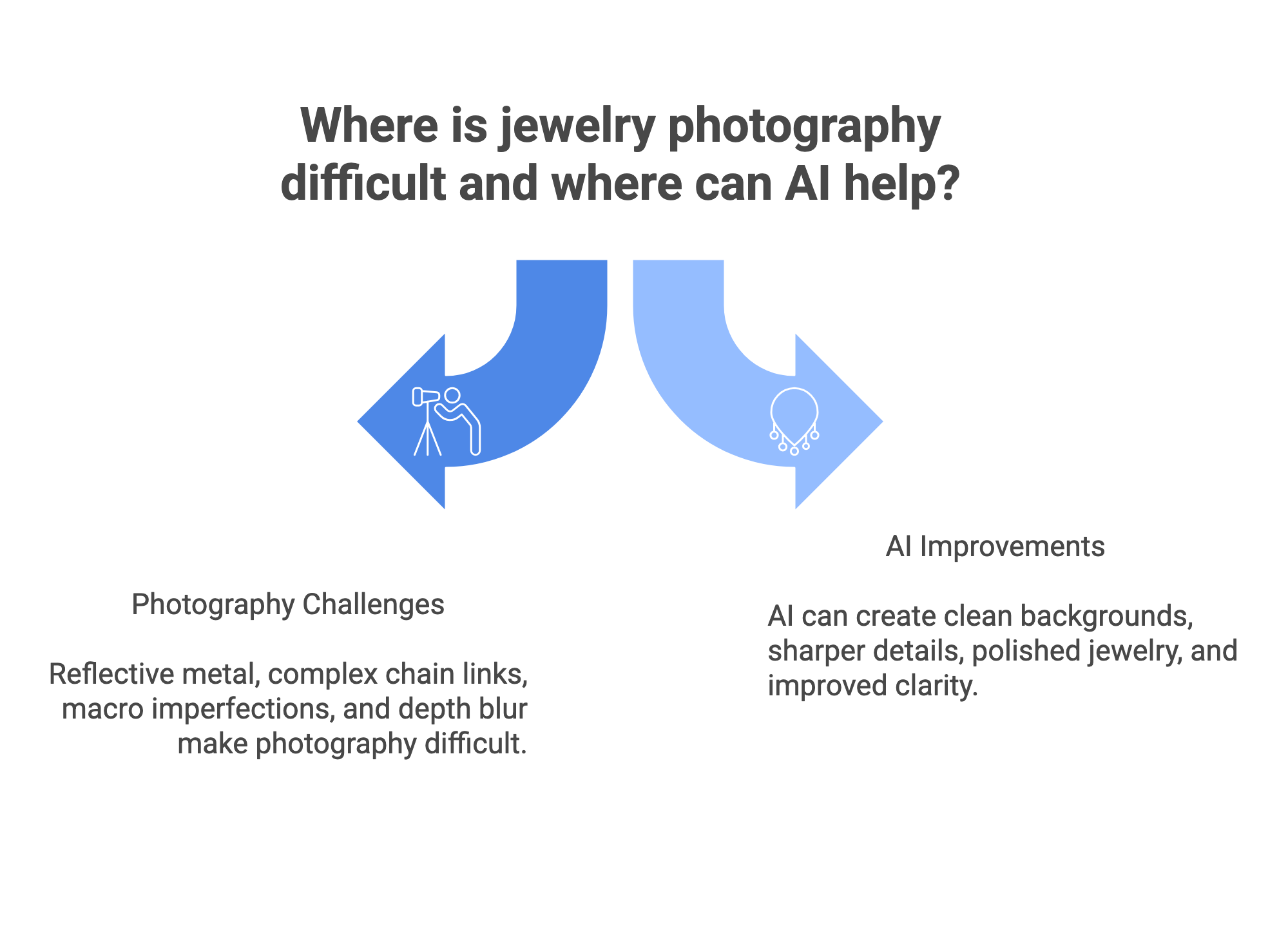
- The five shot types that make a complete jewelry listing: hero white-background, macro detail, scale/on-body, lifestyle context, and packaging.
- AI genuinely handles: background removal and replacement, lifestyle scene generation, colour variant images, and on-model try-on for necklaces, rings, and earrings.
- AI still struggles with: thin chains at low input resolution, heavy filigree background removal, precise gemstone facet geometry on background change, and photo-realistic hand anatomy in generic tools.
- The right workflow for Indian sellers: clean phone/DSLR source photo → AI background removal → white or lifestyle background → on-model generation → bulk variant creation.
Jewelry is the hardest product category to photograph. Polished metals mirror everything in the room. Gemstone facets demand physics-level precision to light correctly. A dust particle invisible to the naked eye becomes a boulder at macro magnification. Historically, that difficulty translated directly into cost — specialised equipment, expert retouchers, hand models hired by the hour. AI jewellery photography has changed what is achievable for small and mid-size jewelry brands: the same phone photo that used to need a studio, a light tent, and an editor can now go through jewelry product photography AI and come out marketplace-ready. But it has specific strengths and specific failure modes that every seller needs to understand before relying on it for their catalog. This guide covers both — with real before/after examples of what AI jewellery shots actually look like.
Why Jewelry Is the Hardest Category in Product Photography
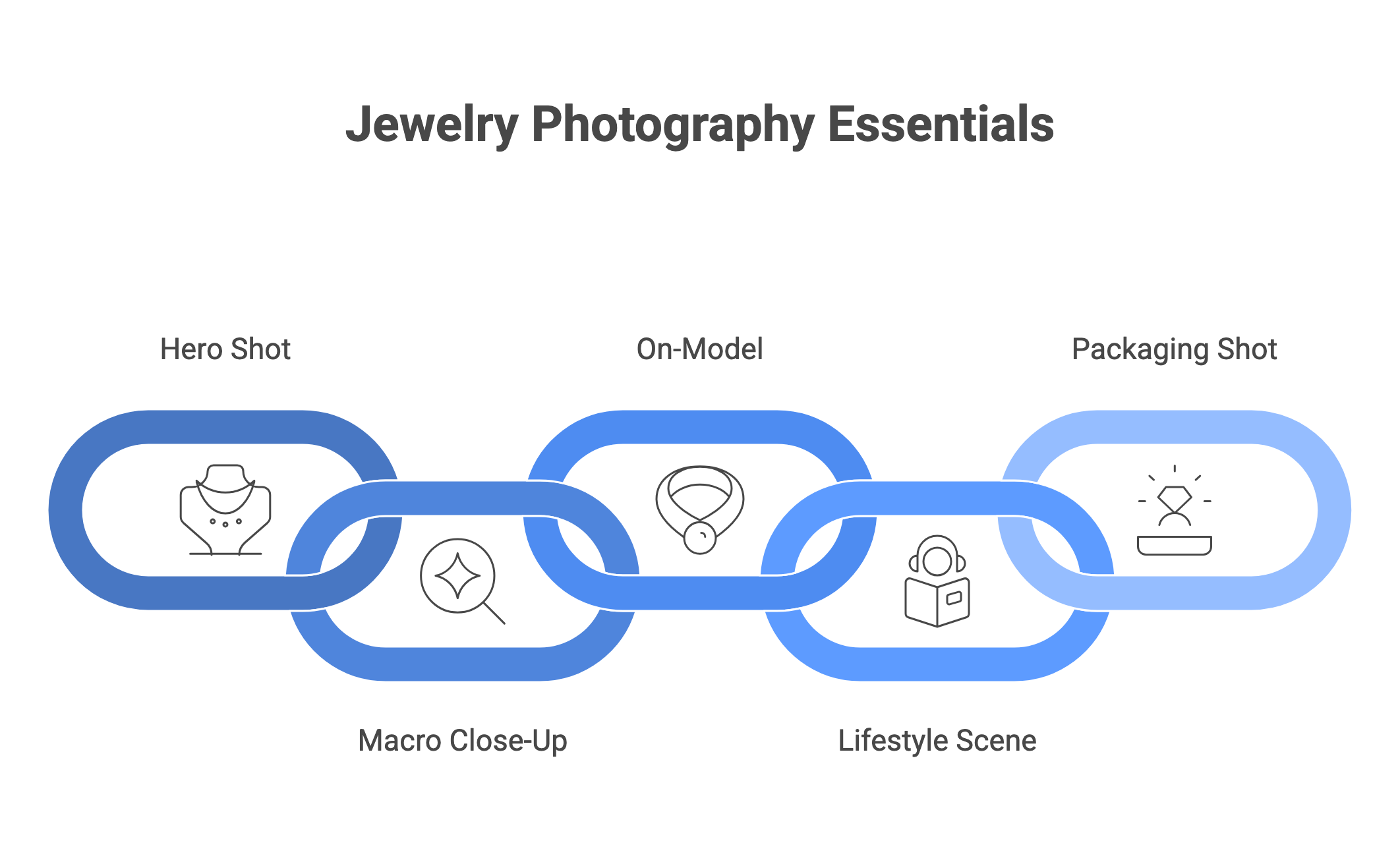
Before understanding what AI changes, it helps to understand exactly what makes jewelry photography technically difficult — because the same challenges that break traditional photography are the ones AI addresses in different ways.
| Challenge | What It Means Physically | Traditional Fix | AI Approach |
|---|---|---|---|
| Highly reflective metal surfaces | Gold, silver, and platinum act like convex mirrors — they capture everything in the room: the camera, the photographer, the ceiling, the floor. | Complex array of white diffusers, light tents, flags, and bounce cards to control what the metal reflects. | Background generation produces environments designed to look like controlled reflections; specialist image-to-image AI handles metal lighting. |
| Depth of field on tiny subjects | Shooting extremely close to a small ring or earring means the depth of field is razor-thin — the front is sharp, the back is blurry. | Focus stacking: shoot 10–20 frames at different focal planes, merge them in post-production. | AI upscaling and clarity tools can sharpen soft source images; image-to-image preserves the focus quality of the original shot. |
| Macro magnification reveals every flaw | At high magnification, invisible fingerprints, dust, and microscopic scratches become clearly visible and require hours of retouching. | Pre-shoot cleaning with gloves, compressed air, microfibre polish; post-shoot retouching in Photoshop (15–45 mins per image). | AI retouching automates removal of dust, minor scratches, and blemishes — effective for flat surfaces; less reliable for complex textures. |
| Scale and context — buyers can't gauge size | A ring or necklace floating on white gives no indication of actual size or how it looks when worn — a critical purchase decision factor. | Hire hand, neck, and ear models; use scale props; hire a creative director to style shots. | AI on-model generation places jewelry on AI-generated hands, necks, and ears — no model booking required. |
| Negative space in chains and filigree | The tiny gaps inside a chain link or fine filigree pattern contain background — background removal tools can leave pixels trapped in these gaps, ruining the cutout. | Manual clipping path in Photoshop — trace every link and gap with the Pen Tool. | General AI background removal frequently fails on dense chain links and fine filigree; specialist tools handle this better; manual fallback still needed for premium fine jewelry. |
The One Rule for AI Jewelry Photography: Image-to-Image Only
This is the most important thing to understand about AI photography for jewelry, and most guides bury it:
| 🚫 CRITICAL: Never Use Text-to-Image AI for Jewelry Product Listings Text-to-image tools (Midjourney, DALL-E, Stable Diffusion, Adobe Firefly) generate a fictional jewel based on your description. They cannot reproduce your specific piece with accuracy. A ring generated from a text prompt may share the general design concept but will have different prong placement, different stone cut, different band thickness — sometimes missing prongs entirely or adding extra ones. Testing by the American Gem Society found that Midjourney 'produced a stunning image with exceptional composition and lighting' but 'created variations that only loosely resembled the original piece' with elements that 'lacked the faithful reproduction needed for product marketing.' If a customer buys based on a text-generated AI image and receives a product that does not match, you face returns, disputes, and negative reviews. Text-to-image is valuable for inspiration, mood boards, and design exploration — not for catalog product images. |
|---|
| ✅ Use Image-to-Image AI for All Catalog Jewelry Photography Image-to-image AI uses your actual product photograph as the input — the AI's job is to change the background, environment, or context, while preserving the real piece exactly. Your necklace, ring, or earring stays as photographed. Only the background, lighting environment, or model context changes. This is how AI tools work, your product photo is the source of truth throughout the pipeline. The output can be taken to marketplace listings because it accurately represents what the buyer will receive. |
|---|
The 5 Shot Types That Make a Complete Jewelry Listing
A single image is insufficient for jewelry — buyers cannot touch the piece, so the image set must do what physical retail does. These five shot types, sourced from Photoroom, Shopify, and professional photography guides, are the standard for competitive jewelry listings:
| Shot Type | What It Shows | Background | Is AI Applicable? | Priority |
|---|---|---|---|---|
| Hero / white-background | Full product, clear detail, no distractions. Primary search result image required by most marketplaces (Amazon, Flipkart, Nykaa). | Pure white or very light neutral | Yes — image-to-image background replacement | Mandatory — first image slot |
| Macro / close-up detail | Gemstone cut and clarity; metalwork texture; clasp mechanism; hallmark; engraving. Answers 'is the quality real?' at full zoom. | White, black velvet, or neutral — background recedes at macro | Partially — AI upscaling enhances source; background removal works on simple backgrounds | Critical for fine jewelry and gemstone pieces |
| Scale / on-body context | The piece worn on a hand, neck, wrist, or ear — answers 'how large is it? how does it sit?' | Skin/natural environment | Yes — AI on-model generation places the real piece on AI-generated hands, necks, ears | Essential for necklaces, rings, and earrings; reduces size-related returns |
| Lifestyle context | The piece in a styled scene — on marble, velvet, or alongside complementary props — answering 'what does this represent?' | Styled surface or scene | Yes — AI background/scene generation from source photo | Strong for premium and gifting segments; social media and homepage use |
| Packaging | The piece in its box, pouch, or presentation case — sets expectations for the unboxing experience and communicates brand quality. | Natural or studio | Partially — background can be enhanced; packaging itself should be photographed real | Recommended for gift-positioned and premium pieces |
How to Shoot the Source Photo That AI Can Work With
The quality of AI output is directly determined by the quality of the source photograph. AI cannot recover details that were never captured. For jewelry, this is especially important because the technical challenges of the category mean poor source photos produce poor AI outputs regardless of tool quality. Here is the minimum viable source photo setup for each jewelry type:
Necklaces and Chains
- Photograph hanging on a white or grey bust — ensures the chain falls naturally with correct gravity drape and the pendant sits correctly.
- If shooting flat, arrange the chain in a U or V shape exactly as it would fall when worn — not coiled or loosely scattered.
- Ensure the full chain length is visible — buyers need to understand the length before purchasing.
- Avoid hard flash — use diffused window light or a softbox; hard flash creates 'hot spots' on gold that remove all surface texture.
- Minimum resolution: clean sharp photo at 2,000px or higher — thin chains below this resolution can be lost by background removal AI.
Rings
- Use a ring holder, invisible wax, or clear acrylic display stand to hold the ring upright — do not lay flat unless specifically shooting a flat-lay.
- Focus must be razor-sharp on the stone setting and any hallmark or texture — this is what buyers zoom into.
- Shoot against a white, grey, or black background — not on a hand for the source photo (AI places it on a model hand in post).
- For multiple-stone rings or complex settings, shoot multiple exposures at different focal depths for later focus-stacking if output quality requires it.
Earrings
- Photograph hanging (from a clear stand or card) or flat on a neutral surface.
- Ensure both earrings of a pair are visible and symmetrically aligned.
- Show the full earring including clasp mechanism — buyers check this before purchase.
- Ensure earring hardware (hooks, posts, clips) is clearly visible and in focus.
Bangles and Bracelets
- Photograph the full circumference so buyers can see the complete design.
- Stack bangles with slight overlap if selling as a set — show the ensemble effect.
- For a single bracelet, shoot on a wrist stand or curved display rather than flat — shows the three-dimensional form.
| Universal Source Photo Rules for All Jewelry Categories Clean every piece before shooting — wear cotton gloves; use microfibre cloth; blow compressed air over gemstones. At macro magnification, a fingerprint looks like a storm. Use diffused natural light (large window, overcast day) or a softbox — never direct flash, never yellow household bulbs. Set white balance correctly — gold should look gold, not orange; silver should look silver, not blue. Use a grey card or manual white balance setting. Shoot at the highest resolution your camera supports — AI upscaling helps, but starts from what was captured. Keep consistent light direction across all pieces in a collection — mixing left-lit and right-lit source photos creates inconsistent AI outputs. |
|---|
The AI Jewelry Photography Workflow: Step by Step
| Step | Action | Tool / Method | What to Check |
|---|---|---|---|
| 1. Clean source photo | Shoot or upload your best raw product photo — jewel in focus, diffused lighting, no harsh hot spots. | DSLR, phone camera, or existing clean shot | Sharpness at 100% zoom; correct white balance; full product visible |
| 2. Background removal | Remove original background — isolate the jewelry in transparent or white. | Scalio background removal or specialist tool | Check chain links, filigree, and prongs — these are where AI background removal most often leaves stray pixels |
| 3. Hero white-background output | Place isolated products on clean white for the marketplace primary image. | Scalio background change → white | Confirm white is pure white (not grey); confirm no product edges are clipped |
| 4. Lifestyle background | Generate a styled scene from source photo — marble surface, velvet, or contextual environment. | Scalio background change → lifestyle preset or custom prompt | Confirm product reflections are consistent with new environment; no floating effect |
| 5. On-model generation | Place necklace/ring/earrings on an AI-generated model — hand, neck, or ear. | Scalio fashion photography / AI model feature | Confirm the actual piece geometry is preserved; check hand anatomy; check metal-to-skin lighting consistency |
| 6. Colour variants | Generate the same design in different metal colours (yellow gold, rose gold, silver) or gemstone colours from a single source shot. | Scalio or AI recolour tools | Confirm metal colour shift is accurate and consistent; check that gemstone colour is realistic |
| 7. Quality review | Review every AI output at 100% zoom before listing. | Manual review | Check: product details intact; no hallucinated prongs or links; no floating effect; colour-accurate |
| ✦ Generate Jewelry Product Photos with Scalio — 5 Free Credits → ✦ White backgrounds · Lifestyle scenes · AI on-model · Indian marketplace-ready |
|---|
What AI Handles Well — and Where It Still Struggles
| Task | AI Performance | Notes |
|---|---|---|
| Background removal — simple shapes | Strong | Works well for pendants, solid bangles, chunky rings with clear outlines. |
| Background removal — chains and filigree | Moderate — specialist tools needed | Thin chain links and fine filigree frequently trap background pixels; manual clipping path may be needed for premium fine jewelry. |
| White background generation | Strong | Reliable across most jewelry types; check edges carefully. |
| Lifestyle background generation | Strong | Contextual scenes from source photos work well; monitor reflection consistency with the new environment. |
| On-model necklace placement | Strong with specialist tools; unreliable with generic AI | Specialist jewelry AI tools preserve chain drape and metal lighting accurately; generic tools frequently hallucinate anatomy. |
| On-model ring placement (hands) | Moderate — highest risk of AI failure | Hands with accurate anatomy are one of the hardest generation tasks for AI; rings may appear distorted or hand proportions may look unnatural in generic tools; specialist tools perform significantly better. |
| Gemstone facet rendering on background change | Moderate | Simple gemstones (cabochons, smooth-polished) handled well; complex multi-facet cuts (diamonds, emeralds) can appear softened or 'melted' in background fill areas. |
| Colour variant generation (metal colours) | Good for yellow/rose/white gold and silver variants | Works well with clear source photos; confirm accuracy before listing. |
| Focus stacking / macro detail enhancement | Partial — AI upscaling helps, does not fully replace focus stacking | AI upscaling sharpens a good source image; cannot add detail that was never captured; complex multi-stone pieces still benefit from manual focus stacking. |
| Dust and fingerprint removal | Strong | Automated retouching handles common blemishes effectively. |
| Engraving and small text on metal | Moderate | Can be preserved in image-to-image workflows; more likely to degrade on background change operations near text. |
| ⚠️ The Golden Rule for AI Jewelry Output Quality Always review AI-generated jewelry images at 100% zoom before uploading to any marketplace. What looks fine at thumbnail scale can show hallucinated prongs, merged chain links, or softened gemstone facets at full zoom — and buyers will zoom in. |
|---|
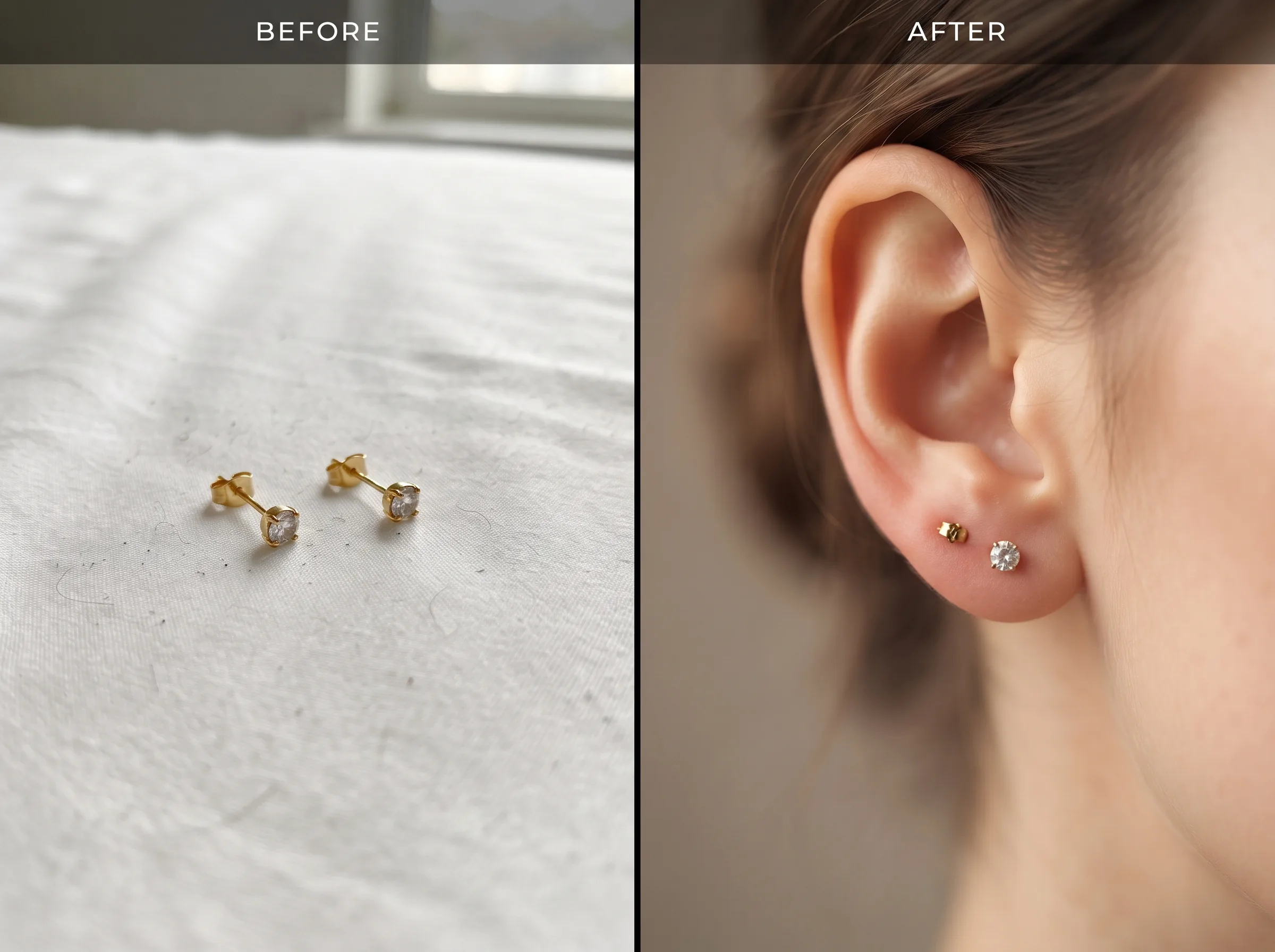
This is what a real AI jewellery photography on-model transformation looks like in practice — same physical earrings, same clasp and stone, just placed on a realistically lit AI-generated ear instead of a flat bedsheet. Notice what stayed identical: stone size, prong count, metal colour. That is the image-to-image discipline this guide keeps repeating — nothing about the actual product changed, only the presentation.
Category-Specific AI Photography Tips
Kundan, Meenakari, and Heritage Indian Jewelry
Traditional Indian jewelry with intricate enamel work, Kundan stone settings, and layered surface detail is among the most challenging AI photography categories. The dense surface detailing and the combination of matte enamel against reflective gold means background change and removal must be done carefully. Recommendation: shoot on a white or very light grey background for the source photo — this gives AI the cleanest possible base for background removal. Lifestyle backgrounds work well for heritage pieces; a marble, silk, or velvet surface reads as premium and appropriate for the category. On-model generation requires a specialist tool that preserves surface detail without smoothing.
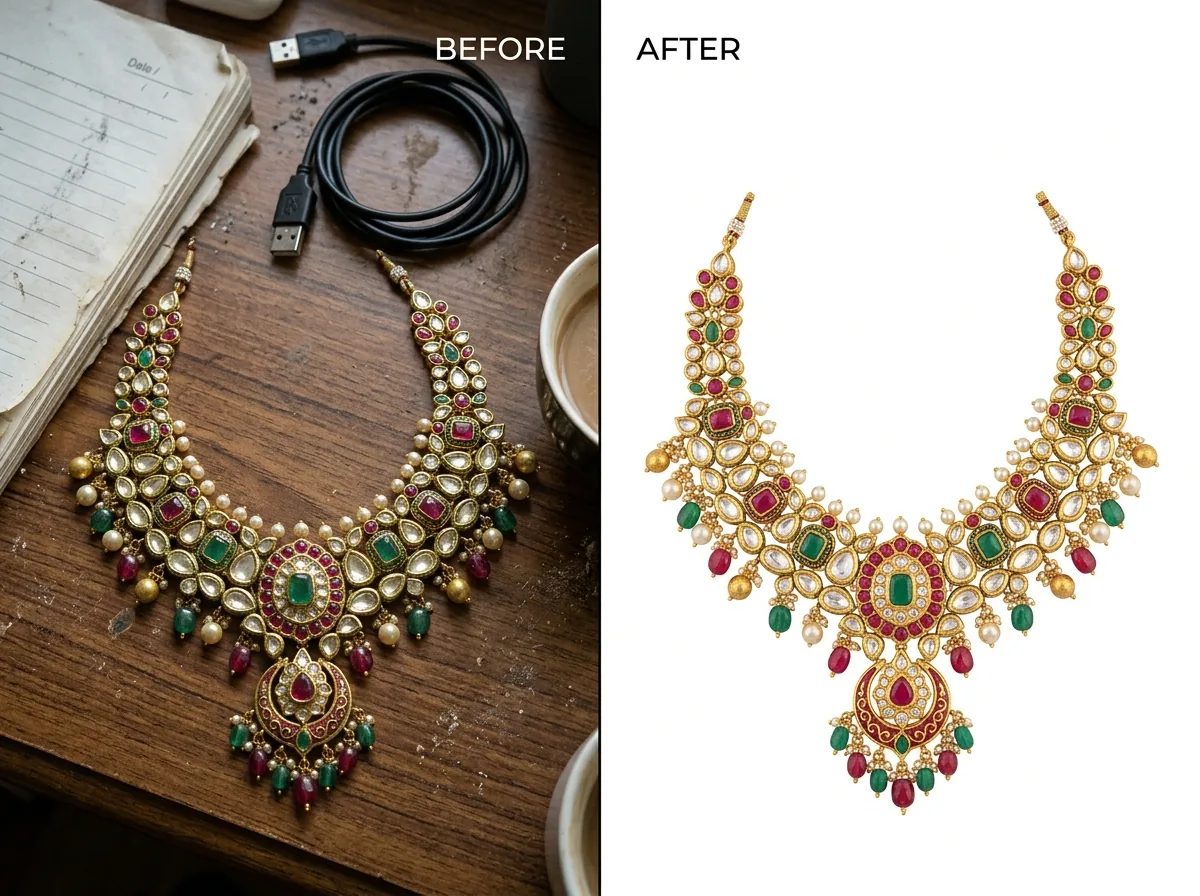
A heavy Kundan necklace like this is exactly the stress test AI jewellery photography has to pass: dozens of small stone settings, mixed matte and reflective surfaces, and a warm gold tone that is easy to shift green or orange under bad lighting. The source photo on the left is a typical phone shot — dim, cluttered, colour-shifted. The AI output on the right keeps every stone setting and prong exactly as photographed while replacing only the background and correcting the lighting to a clean, accurate white-background listing shot.
Artificial / Fashion Jewelry (Imitation, Oxidised, Beaded)
Fashion jewelry sold on Meesho, Nykaa, Myntra, and Amazon India is typically photographed at a commercial scale — many SKUs, fast turnaround, and budget-conscious production. AI is exceptionally well-suited to this category: the simpler surface detail of most fashion pieces means background removal is reliable, and lifestyle backgrounds can be generated quickly at scale. Bulk processing makes it possible to process an entire seasonal catalog overnight. On-model images work well for Nykaa and Myntra listings — buyers of fashion jewelry have a strong preference for seeing the piece worn.
Gold and Diamond Fine Jewelry
Fine jewelry requires the most careful approach with AI. The economic value of the piece means presentation errors have direct commercial consequences — one reason a growing number of jewelry brands are switching to AI necklace photography only after understanding these limits. Rely on AI for background generation and lifestyle context; be more conservative with AI-generated on-model imagery for complex multi-stone settings. For high-value pieces, the investment in a professional clean source photo is worth more than any AI post-processing. When using AI for fine jewelry: always review at 100% zoom; confirm gemstone facets have not been softened; confirm prong counts match the actual piece before listing.
AI Prompt Guide for Jewelry Product Photography
When using AI tools that accept text prompts for background or lifestyle context generation alongside an image input, these prompt patterns produce reliable professional results. These are not text-to-image prompts — they accompany a real product photo as context for the background or scene generation.
| Jewelry Type | Goal | Example AI Prompt Structure |
|---|---|---|
| Gold necklace (any style) | Clean marketplace hero image | 'White studio background, soft diffused overhead lighting, natural shadows, product photography, no props' |
| Diamond ring | Premium lifestyle — social/website | 'Black velvet surface, soft spotlight from above, luxury jewelry boutique atmosphere, shallow depth of field, no human elements' |
| Kundan / Meenakari set | Heritage premium feel | 'Marble surface, warm gold ambient lighting, traditional Indian aesthetic, red silk cloth draped in background, soft bokeh' |
| Fashion earrings (oxidised silver) | Social media lifestyle | 'White marble countertop, white flowers out of focus, soft natural window light, editorial jewelry photography' |
| Gold bangles (stacked set) | Aspirational context | 'Warm oak wood surface, soft morning light, minimal props, luxury still life, product-focused composition' |
| Pearl necklace | Elegant bridal | 'White silk fabric draped surface, soft diffused natural light, cream and pearl colour palette, no hard shadows' |
| Prompt Tips Specific to Jewelry Always specify lighting direction in your prompt — match it to the light direction in your source photo. Mismatched lighting makes products look composited. Add 'natural shadows' or 'realistic shadows' — shadows anchor jewelry in the scene and prevent the floating effect. For reflective metals, avoid high-contrast coloured backgrounds in AI prompts — they will reflect into the metal and may look unrealistic. Diamonds and high-sparkle gems: specify 'subtle sparkle highlights' rather than letting the AI decide — prevents over-saturated or unrealistic light effects. |
|---|
Frequently Asked Questions
Can AI handle jewelry photography with reflections?
Yes, if you use image-to-image tools. They work well for backgrounds and lifestyle shots, but fine chains, gemstones, and reflections still need careful review.
What source photo works best for AI jewelry images?
Use a high-resolution, well-lit photo on a clean white or grey background. Ensure the product is sharp, dust-free, and fully visible.
Can I use Midjourney or DALL-E for listings?
No. They create fictional jewelry, not accurate replicas. Use them for inspiration, not product catalogs.
How do I create on-model jewelry images without a shoot?
Upload your product photo to an AI tool and place it on a model (neck, hand, ear). Works well for listings and ads without hiring models.
What shots are required for Indian marketplaces?
At minimum: one white-background image, one close-up, and one on-model or lifestyle shot. Platform rules may vary.
What are common AI errors in jewelry images?
Chain glitches, wrong prongs, blurry gemstones, floating shadows, lighting mismatch, and hand anatomy issues. Always review at 100% zoom.
| ✦ Generate Jewelry Product Images with Scalio — Try Free → ✦ try for free · White backgrounds · On-model · Indian marketplace-ready · No card required |
|---|