
TL;DR
- Flipkart's image guidelines apply across all categories: images must be real product photographs — illustrations, placeholders, or heavily edited visuals are not accepted.
- Listings should include multiple images (typically 5–8 recommended) showing front, back, angles, close-ups, and usage context.
- Minimum image requirement is usually at least 2, but this can vary by category.
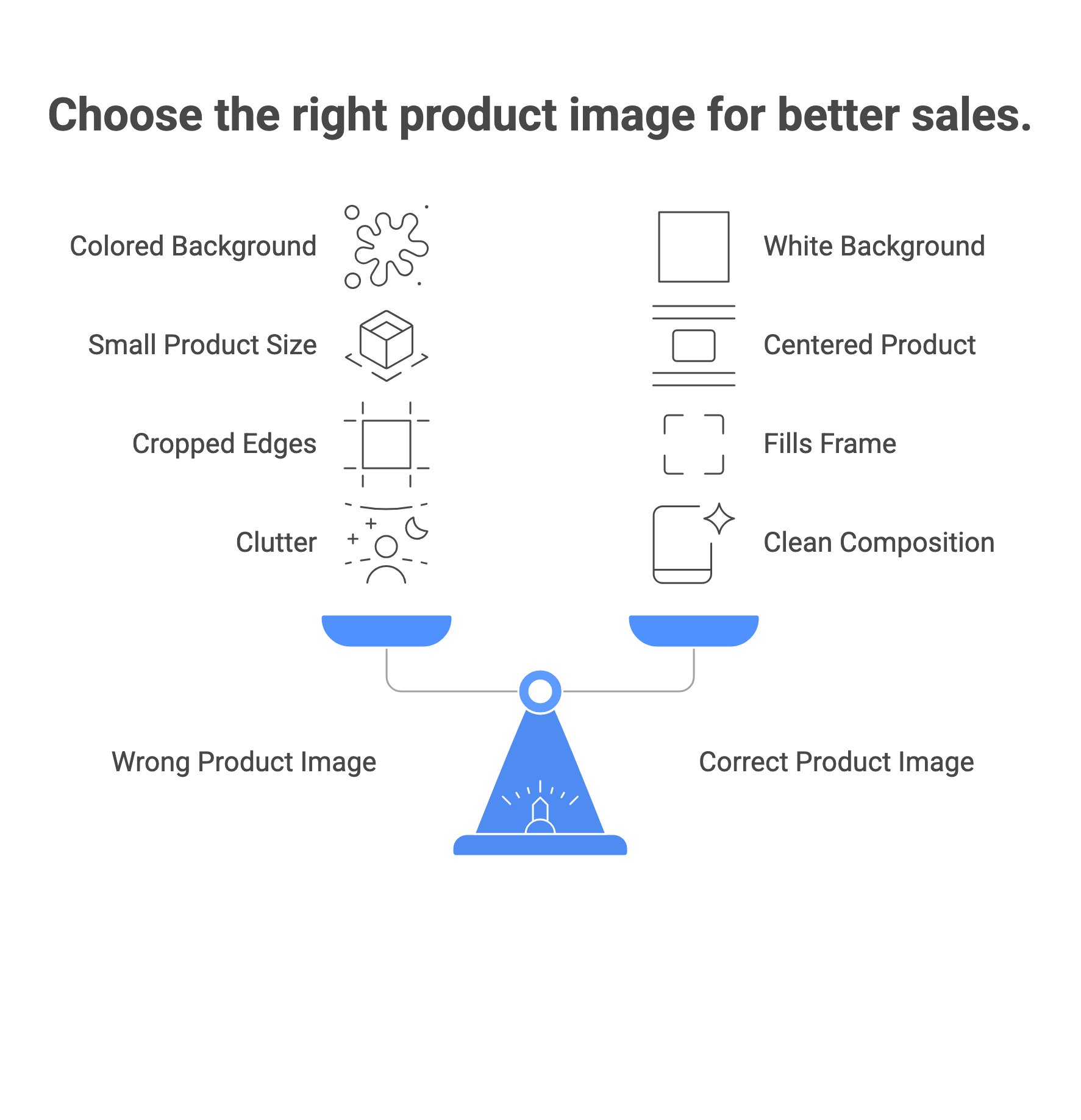
- For many categories, especially fashion, the primary image should have a clean white or light background with no distractions.
- Fashion and apparel categories have additional requirements, including specific angles, model usage in some cases, and pose guidelines.
Product images are the single most visible element of a Flipkart listing. They determine whether a buyer clicks, trusts the listing, and converts — and they're the most common reason listings fail QC and get blocked. This guide covers every Flipkart image requirement across the core technical specs, category-specific rules, and the most common rejection triggers — so you can upload with confidence and avoid the back-and-forth with Seller Support.
Core Technical Image Requirements
These requirements apply to all product categories on Flipkart. Meeting every spec in this table is the baseline — non-compliance causes listing errors, suppression, or outright QC rejection.
| Spec | Requirement | Notes |
|---|---|---|
| Recommended resolution | 500×500px | Minimum 500×500 px, with 1000×1000 px recommended or commonly used as the working standard. |
| Aspect ratio | 1:1 (square) preferred | Square images display consistently across mobile and desktop; non-square images may be auto-cropped. |
| Accepted file formats | JPEG, PNG | JPEG is the recommended format for product images due to file size and quality balance. |
| Maximum file size | File size limits vary; keep images optimized without compromising quality | Keep file sizes as low as possible without compromising quality. |
| Background colour — primary image | White or clean light background required for many categories (especially fashion) | May vary by category. |
| Product frame fill | Product should fill the majority of the frame | Aim for the product to be prominent and clearly visible — do not leave excessive white space around a small product. |
| Watermarks / logos | Not permitted | No watermarks, logos, brand stamps, or promotional text on any image. |
| Text overlays | Not permitted on primary image | Promotional text, MRP displays, and offer badges are not allowed on images. |
| Product representation | Must accurately represent the product for sale | Images must match the listed product — colour variations, patterns, and product details must be consistent with the description. |
| Image type | Real photograph only | No illustrations, drawings, mockups, placeholders, or 'Image Coming Soon' graphics. |
| Minimum images per listing | At least 2 images are generally required | Maximum image count varies by category and seller interface. |
Primary Image Rules
The primary image is what shoppers see in search results. It carries strict rules and cannot be changed after listing without going through Seller Support — unlike secondary images which sellers can update independently.
| ✅ Primary Image — What It Must Show The actual product being sold — not a variant, not a related item, not packaging alone. The front view of the product, centred in the frame. The product on a clean white background — no props, no additional items, no styled scenes. The product at the highest resolution you can produce. The complete product — no cropping of any part of the product at the frame edges. |
|---|
| ❌ Primary Image — What Is NOT Allowed Colourful, patterned, or textured backgrounds. Watermarks, logos, brand stamps, or any text overlay. Promotional callouts: 'Best Seller', 'New Arrival', 'Sale', MRP labels. Multiple products shown when only one is being sold. Products inside packaging — for most categories, the item must be shown out of the box. Accessories or items not included in the sale. Illustrations, 3D renders, or placeholder graphics. |
|---|
| ℹ️ Important — Primary Image Change Process If you need to replace your primary image after a listing goes live, you must raise a request with Flipkart Seller Support and share the new image for approval. The update is applied post-approval. Secondary images (back view, side views, detail shots) can be updated by the seller independently without Seller Support involvement. |
|---|
How Many Images to Upload and What Each Should Show
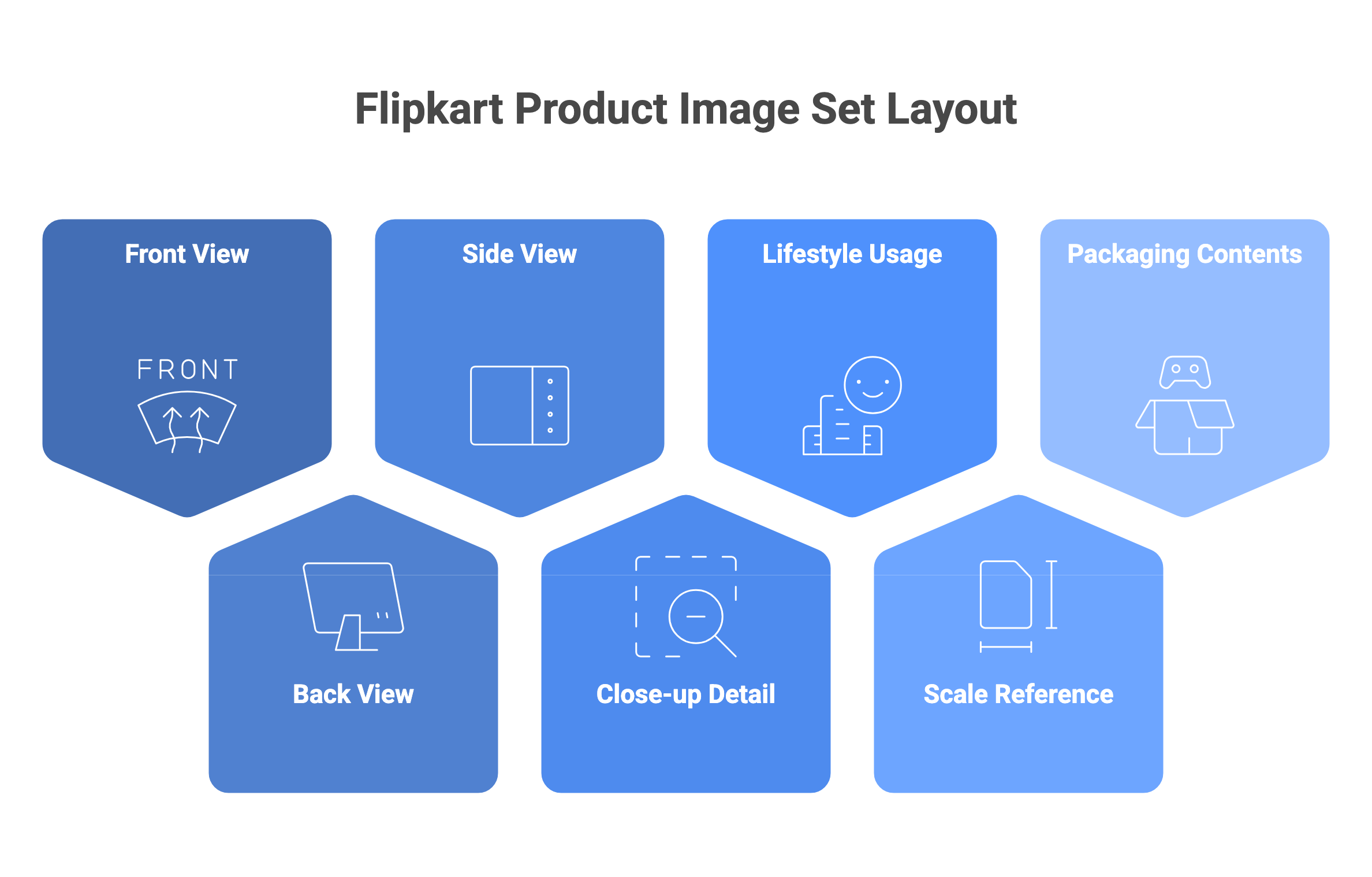
The minimum is 2 images, the maximum is 8 per listing. Aiming for 7–9 images covering multiple angles is the practical standard for competitive listings — it gives buyers a complete view of the product and reduces returns caused by visual mismatch.
| Image | What It Should Show | Priority |
|---|---|---|
| Primary image | Front view, white background, full product, no text | Mandatory — this is your search thumbnail |
| Secondary 1 | Back view — shows design, logo placement, back features | Strongly recommended for all categories |
| Secondary 2 | Side view (left or right) — shows profile, thickness, depth | Recommended for structured products, garments, footwear |
| Secondary 3 | Close-up / detail shot — fabric texture, stitching, clasp, material | Highly effective for fashion, jewellery, electronics |
| Secondary 4 | Scale / in-use context — product with familiar object for size reference | Recommended for electronics, bags, home goods |
| Secondary 5 | Lifestyle shot — product in real-world context | Effective for home décor, fashion, accessories |
| Secondary 6–8 | Additional angles, colour variant, packaging contents | Fill remaining slots with the most useful visual information for your category |
🔗 Flat Lay vs On-Model — Which Converts More →
Category-Specific Image Rules
General rules apply everywhere. These are the additional requirements by category that catch most sellers out during QC:
Fashion and Apparel
- Tops, t-shirts, shirts, kurtis: front and back views are mandatory; side views and fabric close-ups are required for proper representation.
- Bottoms (trousers, jeans, skirts): front, back, and pocket/detail shots are expected.
- Suits and sets: main set image required plus individual component images (top, bottom).
- Innerwear: specific restrictions apply — back images of panties are not permitted; shapewear must not be shown with other products and must be cropped appropriately.
- Accessories (scarves, belts, bags): front view is mandatory.
- Models: sitting positions are not allowed; models must be standing; models should wear appropriate footwear when showing footwear products.
- One model only per product — multiple models in a single image are not permitted.
- Do not include products in the image that are not part of the sales package.
Footwear
- Show the shoe from a consistent angle — typically a 45-degree front view is the standard for footwear categories.
- If selling a pair, both shoes should be visible in context shots; main image practices follow general Flipkart white-background rules.
Electronics and Gadgets
- Show the front face clearly as the primary image.
- Include shots of ports, buttons, and key functional elements in secondary images.
- Accessories included in the sale (cables, chargers, manuals) should appear in a 'what's in the box' secondary image.
- Do not show accessories that are not included in the purchase.
Beauty and Skincare
- Show the product in its packaging as the primary image for sealed goods.
- Include label close-ups showing ingredients/usage instructions as secondary images.
- Shade/colour swatches are useful secondary shots for foundations, lipsticks, and nail products.
🔗 AI for Fashion Photography →
| ✦ Generate Flipkart-Compliant Product Images with Scalio — Free → ✦ White background · Correct margins · Flipkart-ready dimensions · try for free |
|---|
The Most Common Flipkart Image Rejection Reasons
These are the image-specific issues that generate QC rejections and blocked listings — drawn directly from Flipkart's own listing FAQ and the seller error guide:
| ⚠️ Image Rejection Trigger 1 — Blurry or Low-Resolution Images Out-of-focus product shots, motion blur, or images below the 1,000px minimum are rejected. Fix: shoot with steady hands or a tripod; ensure the product is in sharp focus before uploading; upscale low-resolution images using AI before submitting. |
|---|
| ⚠️ Image Rejection Trigger 2 — Non-White Background on the Primary Image Colourful backgrounds, textured backdrops, gradients, or off-white backgrounds cause primary image rejection. Fix: use an AI background removal and replacement tool to generate a clean white background — verify the result visually before uploading. |
|---|
| ⚠️ Image Rejection Trigger 3 — Watermarks, Logos, or Text Overlays Any text on the image — brand name stamps, promotional labels, MRP displays, 'Best Quality' badges — results in rejection. Fix: remove all text and graphics from images; save callouts and branding for secondary images where allowed. |
|---|
| ⚠️ Image Rejection Trigger 4 — MRP Displayed in the Image Showing the Maximum Retail Price on the product image is a specific Flipkart violation — even if the price is accurate. Fix: remove any pricing information from all images, including product labels visible in the photo if the price is legible. |
|---|
| ⚠️ Image Rejection Trigger 5 — Image Does Not Match the Product Description Small differences between the image and listing — a slightly different shade of colour, a different pattern, a different model — cause description rejection. Fix: ensure images are taken of the exact product variant being listed; re-shoot or regenerate images if you have updated the product. |
|---|
| ⚠️ Image Rejection Trigger 6 — Insufficient Images or Missing Mandatory Angles Listings with only one image, or missing the back view for apparel categories, are flagged during QC. Fix: upload at minimum 2 images for all listings; for fashion categories, include front and back views as a minimum. |
|---|
How to Check and Fix Image Rejections in Flipkart Seller Hub
- Log in to Flipkart Seller Hub. Navigate to Listings → Manage Listings. Look at the Status column — rejected listings are marked 'Error' or 'Suppressed.' Click the listing to view the specific rejection reason.
- Review the error message. Common image errors will say 'Primary image error', 'Non-white background', 'Image quality low', or similar. This tells you exactly which image slot has the problem.
- Fix the issue. Replace the flagged image with a corrected version. For the primary image, raise a request via Service Request → Create New Request → Product Listing Related and share the new image. For secondary images, update directly in the listing editor.
- Resubmit for QC. After saving corrections, Flipkart's system processes the changes. Use the Listing Quality Dashboard (Listings → Listing Quality) to monitor health scores and flag potential issues proactively.
- If you believe the rejection is incorrect, appeal via Service Request. Clearly explain compliance, attach the corrected image, and provide any supporting documentation.
🔗 Flipkart Product Photography →
How AI Product Photography Handles Flipkart Compliance Automatically
The most common Flipkart rejection triggers — non-white background, wrong dimensions, low resolution, excessive white space — are all mechanical problems that happen at the image preparation stage, not the shoot stage. AI photography tools eliminate this entirely by building compliance into the generation output rather than requiring manual correction after the fact.
| Flipkart Requirement | What Scalio Does Automatically |
|---|---|
| White background — primary image | AI removes the original background and generates a clean white replacement; no manual retouching required. |
| Product prominent in frame | Smart framing auto-centres and scales the product within the frame. |
| No watermarks or text | Scalio outputs are clean, text-free by default — no brand stamps or overlays on main images. |
| Front and back views for apparel | Multiple pose generation (front, back, side, close-up) from a single garment upload. |
| Category-compliant output | Flipkart marketplace template pre-configured with category-appropriate framing and export settings. |
| Bulk catalog processing | Upload an entire season's catalog — the same pipeline processes every SKU consistently. |
🔗 Bulk Product Photography AI →
Flipkart Image Compliance Checklist (Before Every Upload)
| Run through this before uploading any Flipkart listing image: The primary image has a clean white background — no colour, texture, or gradient. Both width and height exceed 1,000 pixels. No watermarks, logos, text, or promotional badges on any image. MRP is not visible anywhere in any image. Product fills the frame prominently — not floating small in a sea of white space. Product is shown completely — no part cropped at the frame edge. The image is a real photograph — no illustration, render, or placeholder. The image accurately matches the listed product (colour, pattern, model). At least 2 images uploaded (minimum); aim for 7 images across all angles. Fashion categories: front and back views both included; one standing model only; no sitting poses. No products shown that are not part of the sale. |
|---|
Frequently Asked Questions
What is the minimum image size for Flipkart product listings?
The minimum acceptable size is 500×500px, but in practice, 1,000px is the working standard for compliant, high-quality listings.
Does Flipkart require a white background on all images?
White background is required for the primary image in most product categories.
Can I change my primary image on Flipkart after the listing is live?
Yes, but you cannot do it directly. Flipkart requires that changes to the primary image go through Seller Support. You raise a Service Request, share the new image, and it is updated post-approval.
How many images should I upload per Flipkart listing?
The minimum is 2 images. For most product categories, aiming for 7 images is the practical standard: primary (front, white background), back view, side view, close-up detail, scale or in-use shot, lifestyle context shot, and packaging/contents shot. For fashion categories specifically, front and back views are mandatory.
What are the most common reasons Flipkart images get rejected?
The six most common image rejection triggers are: blurry or low-resolution images; non-white background on the primary image; watermarks, logos, or text overlays; MRP price displayed in the image; image that does not match the product description; and insufficient images or missing mandatory angles.
Can I use AI-generated images on Flipkart?
Flipkart's guidelines require that images accurately represent the product for sale. Purpose-built ecommerce AI tools that use your actual product photograph as the input — image-to-image generation — produce images that accurately represent the real product and meet Flipkart's quality requirements. Generic text-to-image tools that generate a fictional product are not appropriate for product listings. Scalio's Product Studio uses your actual product photo as the source, ensuring the output accurately represents what you're selling.
Does Scalio produce images that meet Flipkart's technical specifications?
Yes. Multiple poses (front, back, side, close-up) are generated from a single garment upload. All outputs are automatically formatted to Flipkart's category-appropriate dimensions.
| ✦ Generate Flipkart-Compliant Images with Scalio — Try Free → ✦ try for free · White background · Correct resolution · Front, back, lifestyle — all from one upload |
|---|