
**TL;DR **
- AI image generation works by starting from random noise and gradually shaping it into an image that matches your description — no two outputs are identical
- There are two main technologies: diffusion models (higher quality, better for ecommerce) and GANs (faster but less controllable)
- Generic AI tools like Midjourney are trained on all image types — ecommerce-specific tools like Scalio are fine-tuned on product photography, which is why outputs are more accurate and marketplace-compliant
- Image-to-image (img2img) is the ecommerce superpower — you give the AI your real product photo, it generates a new scene around it while keeping your product intact
- You don’t need to understand prompting to get great results — Scalio’s 50+ marketplace templates do that automatically
- 34 million AI images are generated every day across 2,000+ platforms — your competitors are already using this
Every day, ecommerce brands lose sales to better-looking product images — not better products.
The good news? The gap between a ₹500-a-month startup and a brand running lakhs in ad spend has never been smaller. AI image generation is the reason.
But here’s the thing most guides miss: understanding how ai image generation works is what separates teams who get mediocre outputs from teams who get marketplace-ready, scroll-stopping images on the first try.
This guide breaks it down simply — no PhD required. By the end, you’ll understand exactly what’s happening when you upload a product photo and an AI product photoshoot returns a studio-quality image in under 60 seconds. You’ll also know why ecommerce-specific AI tools produce dramatically better results than general-purpose generators.
Get started with AI product photography on Scalio →
What Is AI Image Generation? (The Simple Version)
The One-Sentence Explanation
AI image generation is what happens when a computer studies hundreds of millions of image-text pairs, learns the relationship between words and visuals, and then uses that knowledge to build a brand-new image from scratch — based entirely on what you describe.
The Analogy That Makes It Click
Think of it like a chef who has tasted 10 million dishes. They haven’t memorised recipes — they’ve absorbed patterns. Ask them for “a light, creamy pasta with lemon” and they’ll create something entirely new that fits exactly what you described.
AI image generation works the same way. It doesn’t copy stored images, it composes new ones from the patterns it has learned.
For ecommerce: when you say “face serum on a marble surface, soft morning light, white background” — the AI draws on millions of absorbed patterns to build that scene from scratch.
This is why the results feel so real. The AI isn’t pulling a stock photo. It’s generating every pixel based on context — lighting physics, surface textures, depth of field, and product placement — all at once.
What Happens Between Typing a Prompt and Getting an Image
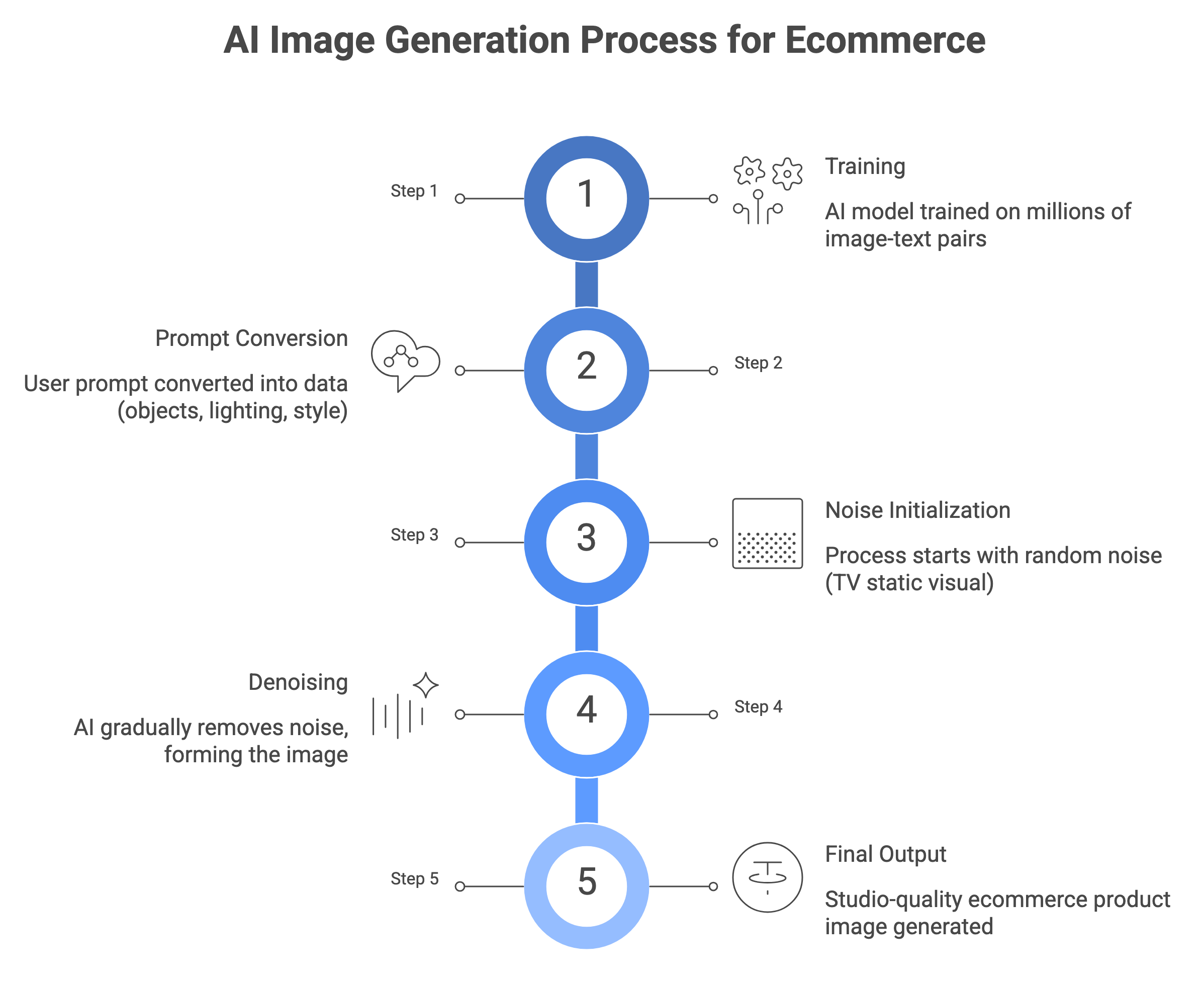
The 5-Step Pipeline
Most people assume AI image generation is a simple lookup. Type something, get something. In reality, there’s a precise pipeline running in the background every single time.
Step 1 — Training The AI studies hundreds of millions of image-text pairs before you ever open the app. It learns that “white background” means clean and isolated. That “lifestyle” means product in a real-world context. That “marble” means cool, grey, and textured. It doesn’t memorise — it internalises patterns.
Step 2 — Your Prompt Arrives You type a description (or Scalio’s template does it for you). The AI converts it into a mathematical fingerprint of what you want — capturing objects, style, mood, lighting, and composition as numbers.
Step 3 — Starting from Noise The AI begins with a completely random field of visual noise — think TV static. This is intentional. Starting from noise ensures every generation is genuinely new, not retrieved from training data. It’s also why no two AI-generated images are ever exactly the same.
Step 4 — Denoising Step by Step Over dozens of refinement passes, the AI gradually removes the noise and shapes it toward your description. Each pass adds more detail: rough form first, then texture, then fine detail. This is the “diffusion” in diffusion models.
Step 5 — Final Output The finished image is rendered at your target resolution. In ecommerce tools like Scalio, this step also checks marketplace compliance — background purity, margins, and pixel dimensions — before the image is delivered to you. The entire process takes seconds. What used to require a studio, a photographer, and a post-production team now runs automatically.
Diffusion Models vs. GANs — Which One Powers Your Product Photos?
If you’ve seen terms like “Stable Diffusion,” “DALL·E,” or “Midjourney” — these all refer to a type of architecture called diffusion models. There’s another older technology called GANs. Here’s what you need to know:
Diffusion Models — What Scalio Uses
- Start from noise and refine step-by-step — produces higher quality and more diverse outputs
- Follows complex, specific prompts accurately — “white background, product centred, soft shadow, marble surface”
- Delivers consistent outputs across large catalogues — same scene, same lighting, every SKU
- The technology behind DALL·E, Stable Diffusion, Midjourney — and ecommerce-tuned tools like Scalio
- Slightly slower to generate — but the quality gap is significant for product images that need to sell
According to Adobe Creative Cloud research, diffusion models are expected to hold a 75% share of AI-generated visual content in professional workflows by end of 2025, owing to their superior quality and prompt adherence.
GANs — Older Generation
- Two competing networks: one generates, one judges — they train each other to improve
- Faster generation — but prone to repetitive, similar outputs (a problem called “mode collapse”)
- Less controllable for specific product details — harder to nail exact brand colours and label accuracy
- Still useful for fast upscaling and some image-to-image tasks
- Largely superseded by diffusion models for high-quality, text-to-image ecommerce work
Bottom line for ecommerce teams: diffusion models win. The extra seconds of generation time are worth it every time when your images need to sell on Amazon, Myntra, or Shopify.
Why Generic AI Tools ≠ Ecommerce AI Tools
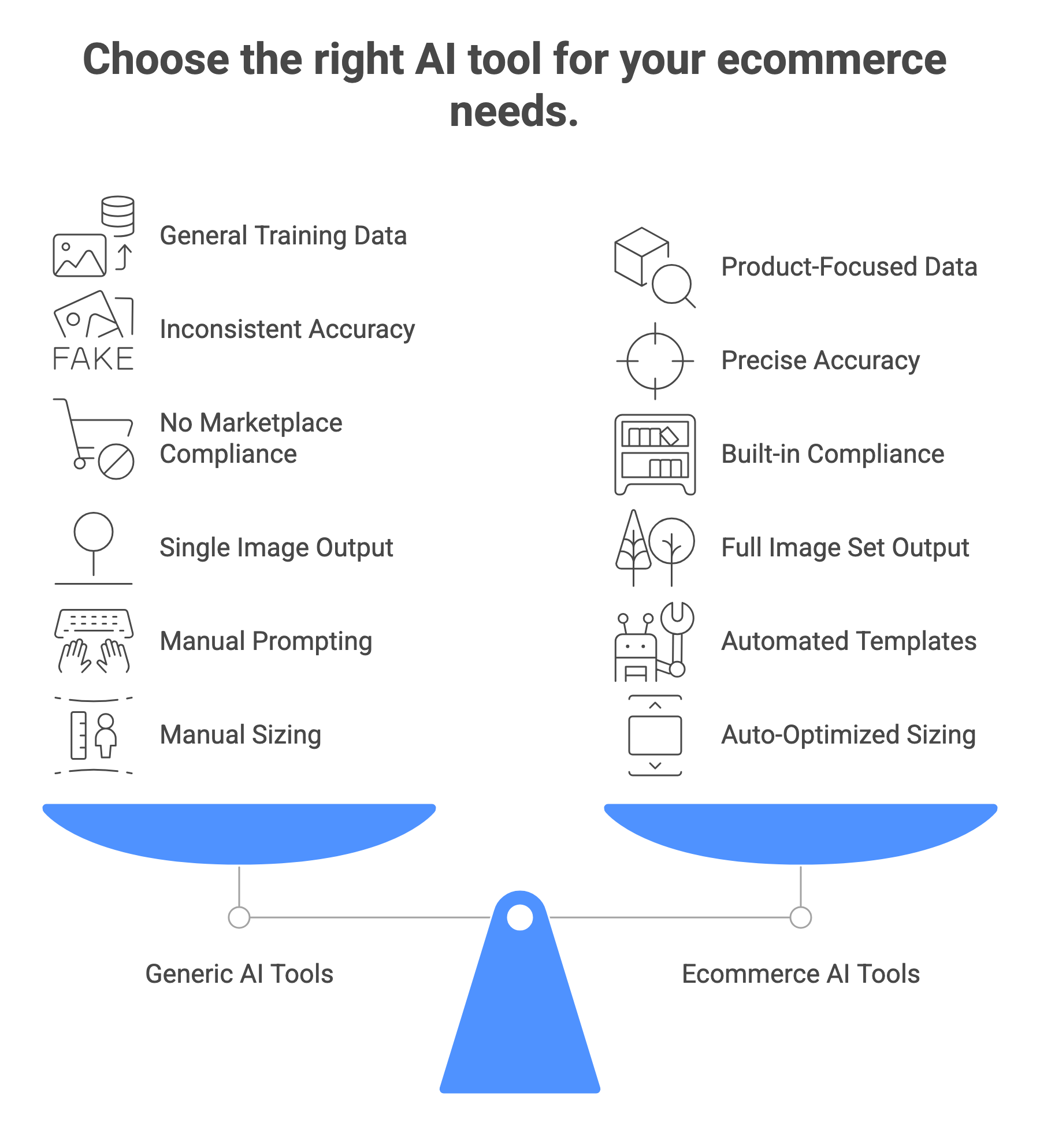
This is the most important distinction most ecommerce teams miss. Using Midjourney or ChatGPT’s image tool for product photography is like using a general-purpose kitchen knife to perform surgery. The technology is impressive — it’s just not built for the job.
| Feature | Generic AI Generator | Ecommerce AI Tool (Scalio) |
|---|---|---|
| Training data | All image types | Fine-tuned on product photography datasets |
| Marketplace rules | No awareness | Amazon, Myntra & Shopify rules baked into templates |
| Product labels / logos | May distort | Preserves product accuracy by design |
| Output | Single image | Full set: hero + lifestyle + infographic in one upload |
| Platform sizing | No auto-sizing | Auto-exports at correct resolution and ratio per platform |
| Skill required | Requires prompt engineering | 50+ ready-to-use category templates — no prompting needed |
The numbers back this up: merchants using AI-enhanced product imagery specifically built for ecommerce workflows have reported conversion rate improvements of 5% to 15% depending on category, according to Shopify’s Future of Commerce data.
Generic tools get you an image. Ecommerce-specific tools get you a marketplace-ready asset built around platform image requirements like those recommended by Shopify.
Amazon Product Photography with Scalio →
Shopify Product Photography with Scalio →
Try Scalio Free — Built for Ecommerce, Not Generic Image Generation → ✦ Try for free before choosing a plan · Amazon, Myntra, Shopify & Flipkart templates ready
How Prompts Work — And Why They Matter for Product Photos
The 4 Elements of a Strong Product Image Prompt
Even if you’re using Scalio’s templates (which handle prompting automatically), understanding prompt structure helps you get better results when you customise — and our library of AI prompts for product photography gives you ready-made starting points.
| Element | Example for a Skincare Product |
|---|---|
| Subject — the what | “Glass serum bottle with gold dropper cap” |
| Background / Scene — the where | “White marble surface, clean studio, soft shadows” |
| Style — the how | “Photorealistic, soft natural light, minimal” |
| Platform intent — the destination | “Amazon main image compliant, product centred, pure white background” |
The Prompt Quality Rule
The AI doesn’t know what your product looks like unless you tell it — the more specific your description of the product, scene, and style, the closer the output is to your vision on the first generation.
Vague prompts produce average outputs. Specific prompts produce your product.
“a product photo” → generic, unusable output. “Glass perfume bottle, gold cap, white marble surface, soft natural side lighting, pure white background, product centred, photorealistic” → marketplace-ready image.
Scalio’s 50+ marketplace templates handle all of this automatically — you upload, pick a template, and the system builds the optimal prompt for you. No prompt engineering needed.
Explore Bulk Product Photography AI →
What Happens When You Upload a Real Product Photo
Image-to-Image — The Ecommerce Superpower
This is the capability that changes everything for real ecommerce brands.
Text-only generation creates new products that don’t exist — impressive, but not useful when you have a real product to sell.
Image-to-image generation gives the AI your actual product as a reference point. It keeps your product intact and generates a completely new world around it.
This is exactly how Scalio’s Product Studio works:
- Upload product photo → AI locks in your product’s shape, colour, and detail
- Choose a background template → AI generates the environment around your product
- Product accuracy preserved — no hallucination of your labels or logo
- Background, lighting, shadows, and reflections generated fresh every time
The result: your real product, in a scene you couldn’t afford to build in a physical studio, in under 60 seconds — a shift that reflects how major ecommerce brands are already using generative AI in production workflows.
This is why AI product photography can reduce shoot costs by up to 70% while actually improving visual quality — a finding consistently reported by brands adopting purpose-built ecommerce AI tools.
🖼 Three-step visual: (1) plain product photo → (2) background removed → (3) new lifestyle scene generated
Where AI Image Generation Fits in Your Ecommerce Workflow
AI image generation isn’t a single tool — it’s a full creative pipeline. Here’s where it maps to your actual workflow:
- Hero / Main Images → White background, centred, marketplace-compliant at 3000×3000px
- Lifestyle Scenes → Product in realistic contexts without renting a studio or hiring models
- On-Model Fashion Images → Garments on AI models with Indian and global poses for Myntra, AJIO, and Flipkart
- Bulk Catalogue Processing → Run hundreds of SKUs through the same visual pipeline simultaneously
- Social & Ad Creatives → UGC-style video generated from a single product photo and static ads
- Image Upscaling → Bring low-resolution product photos up to marketplace standards instantly
The shift is significant: what once required scheduling, booking, and waiting weeks for a photoshoot now runs on demand. Brands can respond to festival seasons, trend cycles, and new launches in hours — not weeks.
✦ See How Scalio’s AI Image Generation Works — Try it Free → ✦ Upload a product photo and get a full image set in under 60 seconds
What AI Image Generation Still Gets Wrong
AI image generation is powerful, but every ecommerce team should know its current limitations:
| Limitation | What to Watch For |
|---|---|
| Highly reflective surfaces | Jewellery, glass, chrome — light physics are complex; outputs may need manual touch-up |
| Tiny text and fine print on labels | Can blur or distort; always inspect label detail on final output |
| Complex multi-product scenes | Placing multiple products accurately in one frame is harder |
| Human hands near products | Fingers are a known weak point; use with caution in lifestyle shots |
| Exact brand colour matching | Slight colour drift can occur; always QA against brand colour codes |
The good news: these limitations are narrowing fast. In 2025–2026, text rendering on labels, reflective surfaces, and multi-product accuracy have all improved significantly — and ecommerce-tuned tools like Scalio apply additional QA layers before delivery.
AI vs. Traditional Photography — Cost Comparison →
Frequently Asked Questions
1. Does AI image generation actually create something new, or is it copying?
Every generation is genuinely new. The AI doesn’t retrieve or remix stored images — it generates pixels from scratch by reversing a noise pattern shaped by your prompt. No two outputs are identical. The ongoing copyright debate in the industry is about training data, not the generation process itself.
2. How is quality different between a free AI tool and an ecommerce-specific one?
Free tools are fine for general creative use. Ecommerce needs accuracy — correct product representation, marketplace compliance, and consistent branding across SKUs. Tools like Scalio are fine-tuned on product photography, include platform-specific templates, and export at the correct specs automatically. General-purpose tools don’t do this.
3. Do I need to understand how AI works to use it effectively?
No. Scalio’s templates handle the complexity automatically. That said, understanding the basics does help you get consistently better results — for example, knowing that the AI reads your prompt literally explains why “good product photo” gives mediocre output, but “white background, soft shadow, product centred, 3000×3000” gives a marketplace-ready image.
4. Will the AI keep my product looking accurate?
In image-to-image mode (Scalio’s default workflow), yes — your uploaded product photo anchors the generation. In pure text-to-image mode, the AI imagines a product rather than using your actual one. Always use image-to-image for real product photography.
5. How many images can I generate with Scalio?
The free plan includes try for free to get started. Paid plans start at $19.99/month for 100 images. The annual plan gives 1,200 images per year at a 15%+ saving.
6. Can AI-generated images be used commercially on Amazon, Myntra, and Shopify?
Yes — provided they accurately represent your product. All major marketplaces accept AI-generated product images. Scalio’s templates are pre-tested against Amazon, Myntra, Shopify, and Flipkart guidelines to ensure compliance out of the box.
7. How is Scalio different from Midjourney or ChatGPT for product photos?
Midjourney and ChatGPT are built for general creative work. Scalio is built for ecommerce product photography — product accuracy, marketplace compliance, batch processing, and full image set generation (not single images) come standard. No prompt engineering needed.
Turn One Product Photo Into a Full Marketplace-Ready Image Set
AI image generation isn’t an experiment anymore. It’s how modern ecommerce teams create visual content faster, more consistently, and at lower cost.
The real question isn’t whether to use AI. It’s whether your current tools are built for ecommerce.
Generic AI tools give you images. Ecommerce AI gives you assets that actually sell.
See the difference on your own product.
Upload one product photo and generate a full set of marketplace-ready images in under 60 seconds.
**✦ Generate Your First AI Product Image with Scalio — Free **→ ✦ No card needed · try for free · Amazon, Myntra, Shopify & Flipkart ready